


What Is Generative UX? A Practical Definition With Real Product Examples
For the last few years, most AI-native products have been described as having a great user experience if they did one thing well: use generative AI to create something impressive from text prompts. Often that output is a wall of text.
Sometimes it is generative UI, where generative AI models create web apps, widgets, or a custom interface generated on the fly. These are real technical advances in how generative AI tools work. But if you have tried building AI systems that end users rely on every day, you have probably hit the same wall: the demo works, the experience does not.
This gap between what generative AI models can generate and what users can actually work with is where AI-native products will succeed or fail. That gap is what we call Generative UX.
The Limits of “Just Chat”
Chat interfaces powered by large language models offer infinite flexibility, and that is also the biggest weakness. A blank input box creates a blank-page problem.
Users do not know what is possible or how to refine what they have already seen. Even when the answer is good, it is often buried in text that is hard to scan or act on, creating pain points that reduce user satisfaction and user engagement.
Take the weather as an example. A structured weather widget with proper UI components, showing temperature, rain, and timing with good color contrast and appropriate font size, is objectively more usable than a paragraph.
That difference has nothing to do with generative AI models. It is about interface design. Generative UX starts from the premise that raw text is often the worst possible interface for decision-making.
The Problem With Generative UI
Generative UI promises to solve usability by having generative AI models create user interfaces instead of text.In practice, though, most generative interfaces follow the same pattern: the AI model generates a complete custom interface in one shot, the end user interacts with the UI elements, and any change requires regenerating the whole thing. Gen UI is strong when answering specific, narrow use cases but inflexible outside of that use case.
This creates three immediate problems. First, latency: if it takes 20 to 60 seconds to generate usable user interfaces, end users abandon before the experience begins, a known issue in ongoing research.
Second, continuity: when the UI is regenerated on every turn, the experience resets, and the system cannot identify patterns in user behavior or incorporate user preferences.
Third, frozen assumptions: a one-shot generative interface encodes a guess about user intent that often turns out wrong. The result is a GenUI system that looks impressive in demos but creates significant pain points for users and their needs. They’re inherently specialised and inflexible. Generative UX Definition: What Makes It Different
Generative UX is an AI system that evolves based on how it’s used and who’s using it.
Unlike traditional UI or Generative UI, which focus on what interface is rendered, Generative UX focuses on how the experience evolves in response to the user.
It encompasses the full experiential layer of AI systems:
- Semantic structure: how information is expressed through meaningful UI components.
- Sequencing: how content is chunked to match user needs at the given moment.
- Affordances: which actions are available through UI elements.
- Latency: how quickly AI systems respond to maintain user engagement.
- Intent modeling: how user intent is inferred through a deep understanding of user behavior.
- Convergence: how the experience guides users toward a decision.
- Mutability: how AI systems incorporate user feedback turn by turn.
As founders of Heywa Labs, we believe that this will be the next evolution of AI-assisted design, combining the expressive power of large language models with the usability of structured user interfaces.
The key shift in the design process: do not think in pages and styles, think in terms of intent and experience. AI systems built for generative UX ask what the individual user knows right now, what they can do next with available UI components, and what should change based on what the user does next.
New inputs mutate the existing interface for that specific user. The experience is personalised to that user at that moment.
Intent Modeling: The Missing Link
At the core of Generative UX design is intent modeling: understanding what the user is trying to achieve and adapting the entire experience based on it. Free-form input is not treated as a command to generate more content, but as a signal to be interpreted in context.
AI systems infer whether the user is refining, constraining, or progressing toward a decision, and adapt the experience using generative models. Without intent modeling, every follow-up looks the same; with it, interaction becomes coherent, and user satisfaction improves.
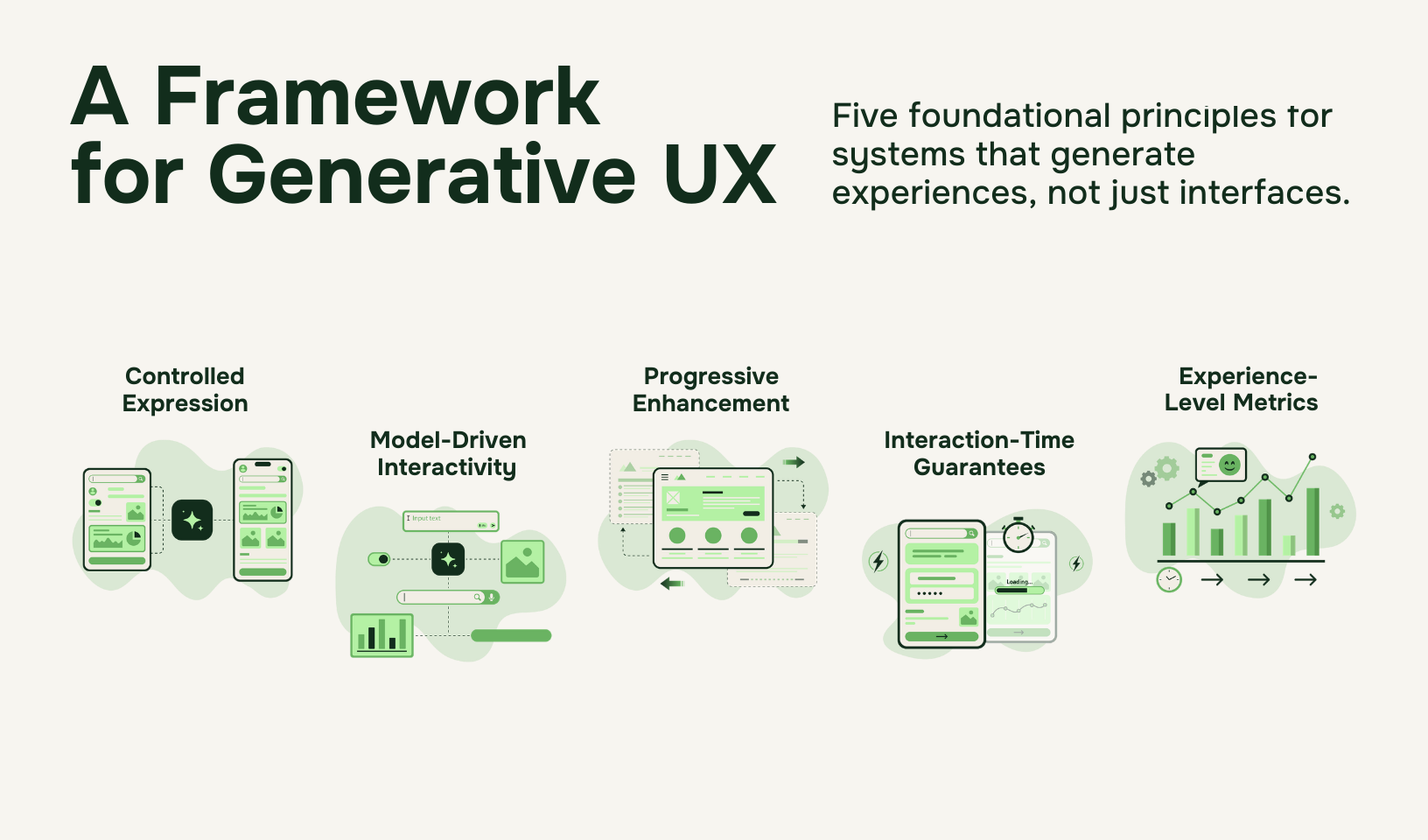
Five Foundational Principles for Generative User Experience Design
At Heywa Labs, we have built our consumer AI product around five principles.
1. Controlled Expression: a curated set of UI components with known semantics and behaviour. Constraints enable clarity and accessibility at scale.
2. Model-Driven Interactivity: free-form input is interpreted by generative AI models but guided through explicit affordances, so every user action triggers reasoning or adaptation.
3. Progressive Enrichment: content is chunked and revealed based on user behavior and user preferences. Depth and complexity are introduced through interaction rather than delivered upfront.
4. Interaction-Time Guarantees: first meaningful interaction must occur within seconds, and subsequent actions must respond fast enough to preserve flow.
5. Experience-Level Metrics: systems are evaluated on how interaction states evolve over time. This includes continuity, in-place mutation, and coherence beyond predefined edge cases, not just output correctness.
Generative UX Examples: Real-World Applications
Here are a few examples:
Mutating in place instead of starting over
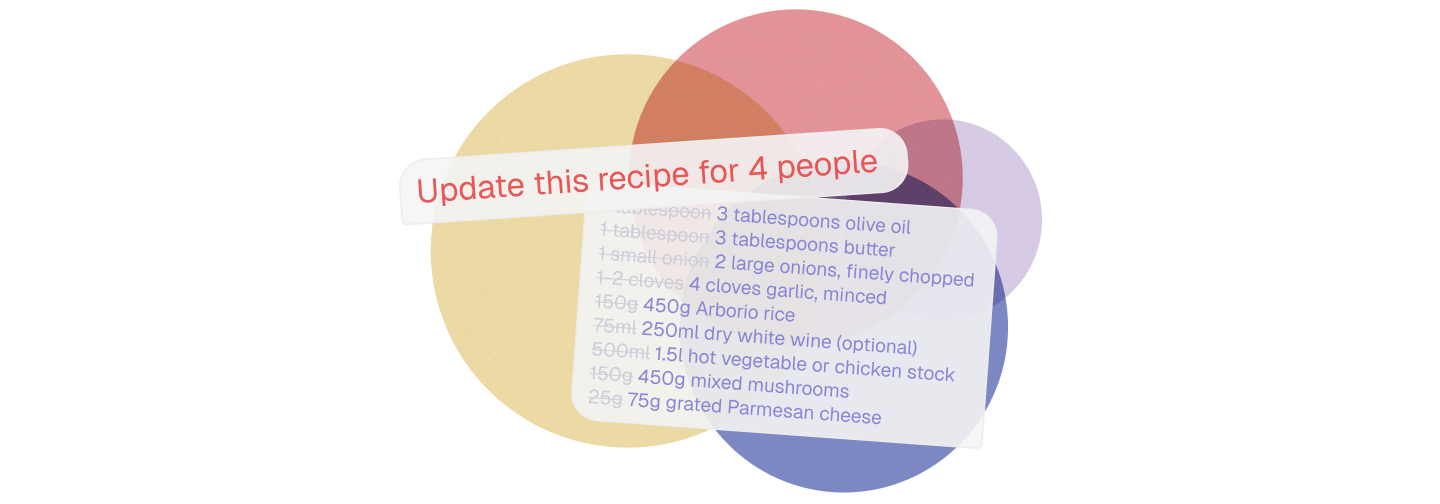
If an individual user asks for a recipe for two and then says make this for four people, a traditional chat interface generates a new block of text.
A Generative UX system updates the existing interface built for that user in place: quantities change, cooking times adjust, the user can switch between Calcius & Fahrenheit, and UI components remain intact.
The user experience evolves instead of resetting, maintaining context awareness across user preferences like unit conversions and difficulty levels.
Chunking instead of dumping
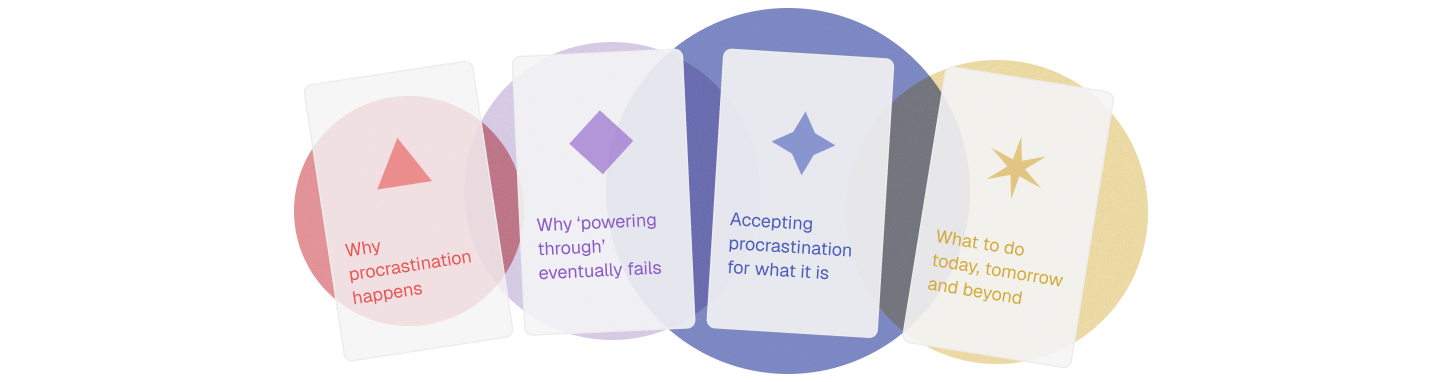
In Generative UX design, information is deliberately chunked into structured UI components: one card explains the core idea, another compares options, and another exposes a calculator or checklist.
More detail appears only when the individual user signals interest through user behavior, a key insight from user research that reduces cognitive load.
Affordances replace guesswork

In generative user interfaces built with Generative UX principles, UI elements suggest meaningful next actions based on user intent; buttons like Compare A vs B or What if I only have two days.
These great ideas for interaction in the custom interface generated by AI systems guide users forward, a generative interface ux pattern that applies across digital experiences.
Converging toward outcomes

Good user experience design reduces choice based on a deep understanding of user needs.
In travel planning using generative AI tools, this means starting with inspiration, narrowing based on user preferences, and ending with a confident decision. Generative UX optimises for convergence, not endless exploration.
Using utilities where text breaks down

Mortgage calculators, cost-per-day simulators, comparison tables with appropriate colour schemes and font sizes, and checklists that track user behaviour are all examples of where interface-based tools outperform paragraphs.
In Generative UX, these appear as structured UI components embedded directly into the digital experience.
Why Generative UX Matters
We are at an inflection point. AI is no longer a novelty for early adopters; users now expect AI to solve everyday problems. And right now, most generative AI software is failing them.
When experiences rely on walls of text, brittle one-shot interfaces, or slow regeneration cycles, users disengage. If that pattern continues, AI-generated software risks being dismissed the same way much AI-generated content already is: impressive, but ultimately disposable. Slop, not substance.
That would be a missed opportunity. Generative AI has the potential to make software radically more personalised, adaptive, and responsive to individual needs. But without a disciplined approach to experience design, that potential will be squandered.Many AI systems look good on happy paths and collapse under real use with different users facing edge cases. Generative UX shifts the evaluation question: not did the generative AI model answer correctly, but did the user experience remain coherent as the individual user interacted? That distinction determines trust.
Generative UX matters because it determines whether an AI will become software people rely on, or just another overhyped layer that users quietly abandon.
From Theory to Practice
Building this way is harder than shipping a chat box or a generative demo.
The design process requires explicit interaction state instead of stateless outputs from generative AI models, intent modeling instead of raw prompt chaining, and interaction-time guarantees instead of best-effort latency.
At Heywa, we are building under these constraints because they are necessary if artificial intelligence is going to move from novelty to infrastructure.
Generative UX is a discipline still requiring further research, and the trade-offs required to make it work across different use-cases are real. We believe it can be improved through user feedback and design workflows, and we do not believe any one company should own it.
An Open Invitation to Shape How Generative UX Evolves
Generative UX is an emerging field & progress will require collaboration across the industry. We invite founders, AI researchers, product designers, engineers, cognitive scientists and the wider tech community to help define shared language and standards, best practices and patterns, meaningful metrics, benchmarks and open research questions.
Let’s build this next interface layer together at generativeux.com.
